


Choosing the Best Broker for Stock Option Alerts
Choosing the best broker for stock option alerts comes down to three things: fast and reliable order placement, tight options pricing data, and fees that fit how often you trade. No single broker is perfect for everyone. A desktop-first trader who wants deep charting may thrive on thinkorswim. A cost-focused, high-volume trader may prefer Interactive Brokers. A beginner who mostly reacts from a phone may lean toward a simpler mobile app.
This guide walks you through what actually matters when you follow an options alert service. It covers how today’s major brokers compare after recent industry changes and how to set up your account so you can act on an idea with discipline instead of panic.
Options alert services do not need special “integration” with your broker. You read the alert and place the order yourself. The best broker for you is the one that gives you accurate real-time quotes, clean limit-order tools, a mobile app you trust under pressure, and a fee structure that matches your trading frequency.
| Topic | Picking a broker to act on options alert ideas |
| Brokers Covered | Schwab (thinkorswim), Interactive Brokers, E*TRADE, Fidelity, Robinhood |
| Biggest Change | TD Ameritrade no longer exists as a separate broker; thinkorswim now lives at Schwab |
| Must-Have Tool | Limit orders with real-time bid/ask quotes on the option chain |
| Typical Fee Model | $0 stock commissions; per-contract options fee at most brokers |
| Skill Level | Beginner to intermediate |
Why Does Your Broker Matter When You Follow Options Alerts?
Your broker is where an educational idea turns into a real decision with real money, so its speed, quote quality and order tools directly shape your results. A good alert read on a clunky platform can still lead to a sloppy fill.
Options move fast. An option contract can reprice meaningfully in seconds when the underlying stock jumps. If your app lags, your quotes are delayed or your order ticket is confusing, you end up chasing prices instead of executing a plan.
There’s a common myth worth clearing up. Many older articles claim certain brokers offer “seamless integration” with alert services. In practice, alert services like ours deliver ideas through channels such as text, email or app notifications. You review the setup, decide whether it fits your plan and place the order manually. If you’re new to that workflow, start with our guide on how to use options alerts.
What Should You Look for in a Broker for Options Alerts?
Focus on five factors: real-time options data, order-entry speed, mobile reliability, options fees and account flexibility. Flashy features matter far less than these fundamentals.
- Real-time option chains. You need live bid and ask prices, volume and open interest to judge whether the current price is near the alert price.
- Fast, clear order tickets. You should be able to find a specific strike and expiration and send a limit order in a few taps.
- Mobile stability. Alerts often arrive when you’re away from your desk. A crash-prone app is a real cost.
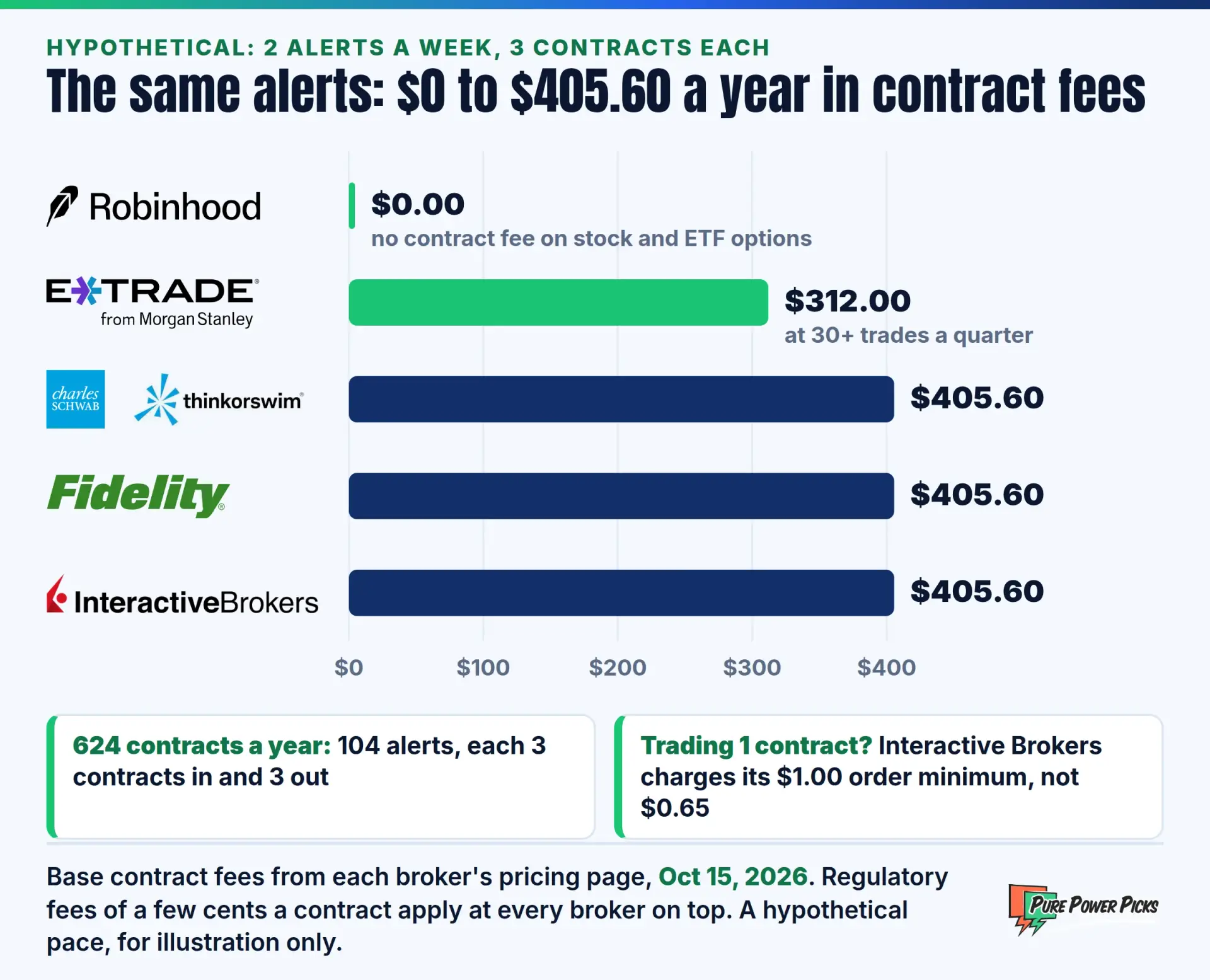
- Options pricing. Per-contract fees add up quickly if you trade multiple contracts often.
- Account types and approval levels. Make sure the broker approves the options level you need and offers the account type you want.
Bid-Ask Spread: The gap between the highest price a buyer is willing to pay (bid) and the lowest price a seller will accept (ask). Wide spreads on thinly traded options can quietly cost you money on every order. Investopedia has a solid primer on the bid-ask spread.
Which Brokers Work Best With Options Alert Services in 2026?
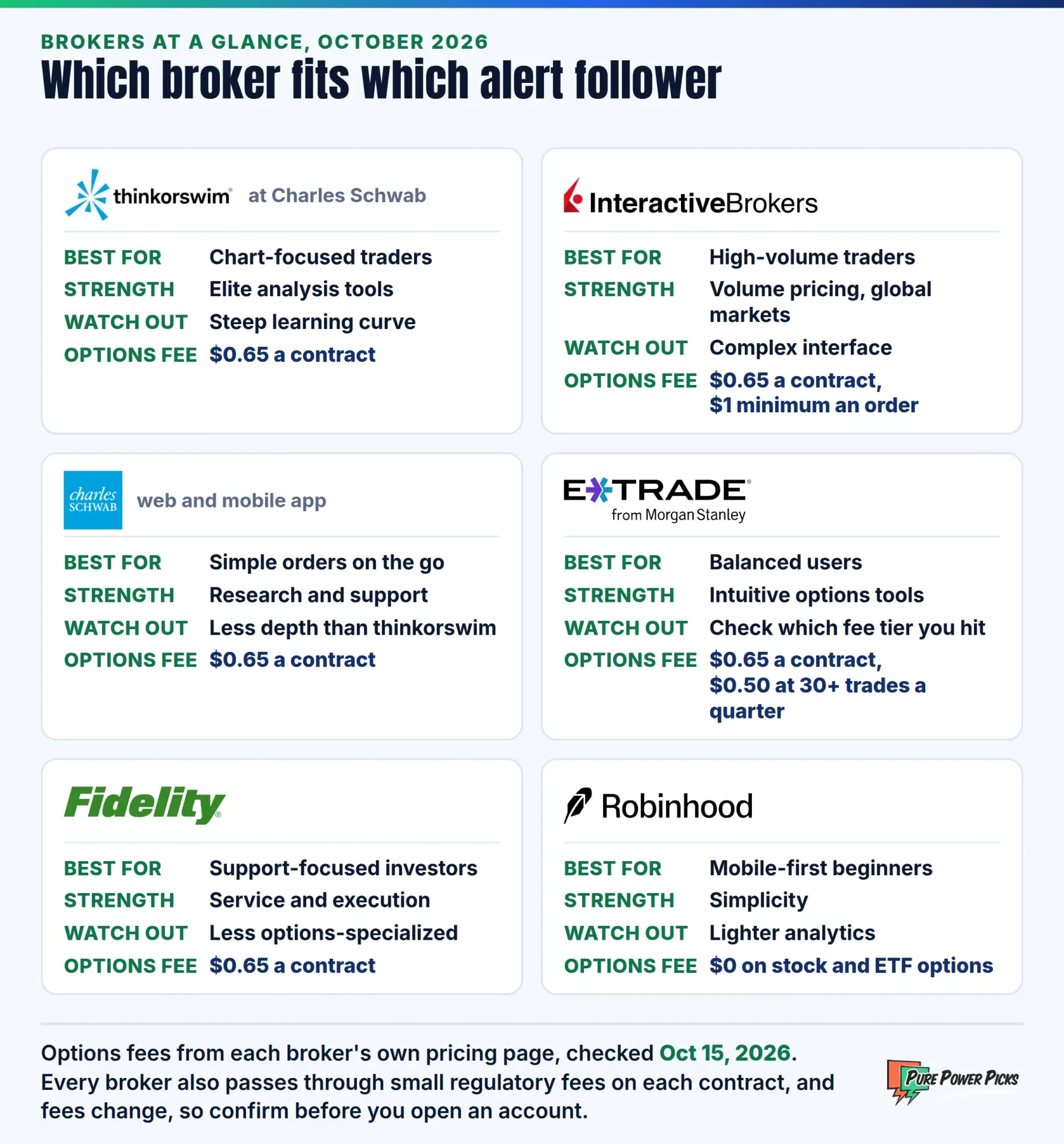
The strongest choices for most alert followers are Schwab’s thinkorswim, Interactive Brokers, E*TRADE, Fidelity and Robinhood. Each one fits a different type of trader. Fees and features change often, so always confirm current pricing on the broker’s own website before you open an account.
1. thinkorswim (Formerly TD Ameritrade, Now Charles Schwab)

The original version of this article listed TD Ameritrade first. That broker has since been fully absorbed into Charles Schwab, and its famous thinkorswim platform now runs under the Schwab name. It remains one of the most powerful free options platforms available to retail traders.
You get advanced charting, a deep option chain with Greeks, probability analysis and strong paper-trading tools on desktop, web and mobile. It’s ideal if you want to study a setup visually before acting on an alert. The tradeoff is a steep learning curve. Get the full breakdown in our review of thinkorswim by schwab.
2. Interactive Brokers

Interactive Brokers (IBKR) is built for active, cost-conscious traders. Its standard options rate is the same $0.65 a contract most brokers charge, but on IBKR Pro the rate falls as your monthly volume grows, to as little as $0.15 a contract above 100,000 contracts a month. It also offers access to global markets plus sophisticated risk tools.
Its flagship Trader Workstation is extremely capable but can feel overwhelming to beginners. Its simpler desktop and mobile apps soften that learning curve. If you trade frequently and want precise order control, IBKR deserves a hard look. See our full take on interactive brokers for options.
3. Charles Schwab (Standard Web and Mobile)

Beyond thinkorswim, Schwab’s standard website and mobile app give you a cleaner, simpler way to place options orders. You also get Schwab’s research, educational library and widely praised customer support.
This combination works well if you want one account with two experiences. Use the streamlined app for quick orders on the go, and open thinkorswim when you want to analyze a chart in depth.
4. E*TRADE (From Morgan Stanley)

E*TRADE, now owned by Morgan Stanley, offers a balanced experience. Its Power E*TRADE platform is especially friendly for options traders, with visual strategy tools, risk graphs and an intuitive order flow.
It sits in a nice middle ground: more capable than beginner apps, yet less intimidating than thinkorswim or Trader Workstation. E*TRADE has historically offered reduced per-contract pricing for higher-volume traders, so check the current tiers.
5. Fidelity

Fidelity is known for excellent customer service, deep research and strong order execution quality. It’s a great fit if you value support and want to keep your long-term investing and options trading under one roof.
One correction from the original post: Fidelity does charge a per-contract fee on options trades. Its options tools have improved over the years, but many active options traders still find its workflow less specialized than thinkorswim or Power E*TRADE.
6. Robinhood

Robinhood popularized commission-free trading and still charges no per-contract commission on options. Small regulatory and exchange fees can still apply. Its mobile-first design makes it easy to act quickly on an alert without wading through complex menus.
Robinhood has also expanded with a desktop platform for more active traders. The tradeoff is less analytical depth than full-featured platforms. Read our breakdown of robinhood for options traders before you commit. Other popular options-focused brokers include tastytrade and Webull, and our guide on which trading broker is best helps you compare the wider field.
| Broker | Best For | Main Strength | Watch Out For |
|---|---|---|---|
| Schwab / thinkorswim | Chart-focused traders | Elite analysis tools | Learning curve |
| Interactive Brokers | High-volume traders | Low costs, global access | Complex interface |
| E*TRADE | Balanced users | Intuitive options tools | Per-contract fees |
| Fidelity | Support-focused investors | Service and execution | Less options-specialized |
| Robinhood | Mobile-first beginners | Simplicity, no per-contract commission | Lighter analytics |
Should You Use a Cash Account or Margin Account for Alerts?
For most beginners buying calls and puts, a cash account is the simpler, lower-risk starting point. A margin account adds flexibility but also adds complexity and the potential for larger losses.
In a cash account, you trade with settled funds only. Options settle quickly, which makes cash accounts workable for many alert followers. We cover the mechanics in detail in our article on trading alerts in a cash account.
The regulatory landscape has also shifted. Pattern day trader restrictions historically limited how often small margin accounts could day trade. Read our breakdown of the end of the pdt rule, then confirm exactly how your broker has applied the change to your account type.
Options can lose 100% of their value, sometimes in a single session. Never fund a trading account with money you need for bills or emergencies. Before trading, read the official options risk disclosure, Characteristics and Risks of Standardized Options, which your broker is required to provide.
How Do You Set Up Your Broker to Act on Alerts Quickly?
Prepare before an alert ever arrives. Get your options level approved, fund the account, enable notifications, set up a watchlist and learn your order ticket cold. Speed comes from preparation, not from rushing.
- Get options approval early. Approval can take a day or more, so don’t wait until you see an idea you like.
- Turn on two-factor login and saved devices. You want security without fumbling through lockouts.
- Practice in paper trading. Most major brokers offer simulated accounts. Use one to rehearse finding strikes and expirations.
- Default to limit orders. Market orders on options can fill far from the price you expected. Review our guide to order types for options.
- Pre-decide your risk. Know your maximum dollar risk per idea before you open the app.
Let’s walk through a hypothetical scenario. Say an educational alert highlights a call option on a stock, with an alert price of $2.00 per contract. When you open your broker, the option chain shows a bid of $2.05 and an ask of $2.15.
Instead of hitting “buy at market,” you place a limit order at a price you’re comfortable with based on your own plan, perhaps $2.10. If it doesn’t fill and the price runs away, you let it go. This hypothetical shows why real-time quotes and a clean limit-order ticket matter more than almost any other broker feature. You can learn more about how limit orders work on Investopedia.

Run a “fire drill” this week. Pick any liquid stock, pull up its option chain, and time how long it takes you to stage a limit order for a specific strike and expiration without sending it. If it takes longer than a minute, keep practicing or consider a simpler platform. For more structured learning, Cboe’s education center is a great free resource.
How Do You Make Your Final Broker Decision?
Match the broker to your habits, not to hype. Ask yourself where you’ll be when most alerts arrive, how many contracts you expect to trade each month and how much analysis you want to do before acting.
If you’re mostly mobile and just getting started, simplicity wins. If you love studying charts, thinkorswim or Power E*TRADE will feel like home. If you trade often and care deeply about costs, Interactive Brokers is hard to beat. If you want world-class support, Fidelity and Schwab stand out.
Many experienced traders also keep two accounts: one for deep analysis and one for quick mobile orders. There’s no rule that says you have to pick just one.
Frequently Asked Questions
Do options alert services connect directly to my broker?
Generally, no. Most alert services, including ours, deliver educational ideas through notifications. You decide whether to act and place every order yourself in your brokerage account.
Is TD Ameritrade still a good choice for options alerts?
TD Ameritrade no longer operates as a separate broker. Its accounts moved to Charles Schwab, and the thinkorswim platform is now available through a Schwab account.
Are commission-free brokers really free for options?
Not entirely. Even brokers with no per-contract commission pass through small regulatory and exchange fees. Bid-ask spreads and fill quality are hidden costs that matter just as much as the advertised commission.
What options approval level do I need to follow alerts?
It depends on the strategies involved. Buying calls and puts usually requires a basic approval level. Spreads and selling strategies typically require higher levels, and naked option selling requires the highest.
How do Pure Power Picks alerts work with my broker?
Our alerts are educational chart setups that include the contract and the price at the time of the alert. You can review the full process in how our trade alerts work, then decide independently in your own account whether an idea fits your plan.
You’ve Picked Your Broker. Now Sharpen Your Process.
Pure Power Picks delivers educational options chart setups with clear reasoning behind every idea, so you learn to read the market, not just react to it.
Explore Alert Plans
The PPP Team is the research and editorial team behind Pure Power Picks. We trade stocks and options and publish the work as we do it, with every alert tracked in public. Publishing since 2020. How we research and correct our work is written out in our editorial standards. Our content is strictly educational, never advice.
Disclaimer: The content provided by Pure Power Picks is for educational and informational purposes only and does not constitute financial, investment, tax or legal advice. We are not registered financial advisors or broker-dealers. Options trading involves substantial risk and is not suitable for all investors. You can lose more than your initial investment in certain strategies. Broker features, fees and policies change frequently, so verify all details directly with each broker. All examples are hypothetical and for illustration only. Past performance, including any historical highs reached by alerted contracts, does not guarantee future results. Always do your own research and consider consulting a licensed financial professional before making investment decisions.