


PLTR
Palantir$190 CallExp. Oct 16, 2026
- Contract High (%)
- +397.1%$4.55 to $22.62
on Oct 12 - Alerted
- Sep 15, 2026Stock $175.09
- Targets reached
- 5 of 5Stock levels
Get the next 3 to 5 stock & options alerts free - in the app and by email.
Get the next 3 to 5 stock & options alerts free - in the app and by email.
Access starts when you sign up. No credit card required. Educational content. Unsubscribe anytime.
Selected historical alerts, not typical results. NOW $120 Call, alerted Jul 1, 2026 with the stock at $106.28: Contract High +94.0% on Aug 21 ($5.85 to $11.35); stock closed $128.48 that day. AAPL $265 Call, alerted Mar 31, 2026 with the stock at $253.70: Contract High +559.3% on May 15 ($5.80 to $38.24); stock closed $300.23 that day. XOM $145 Call, alerted Jul 2, 2026 with the stock at $137.11: Contract High +826.6% on Aug 20 ($2.56 to $23.72); stock closed $166.15 that day. NVDA $230 Call, alerted Sep 11, 2026 with the stock at $219.63: daily option history records a High of $14.70 (+188.2%) on Oct 6 from $5.10; the older final summary records $14.40 (+182.3%). The mobile replay follows the daily history. Stock closed $239.24 that day.
“They don't overwhelm you with multiple picks every day.”Needle · Trustpilot
“I work a full-time job so this works for me.”James Baptiste · Trustpilot
“Simple and straight forward with explanation behind the choice of trade.”Rimmi Randhawa · Trustpilot
“Great customer service and quick to respond if you have a question.”Gregg Rodes · Trustpilot
Every alert comes with a plan
Read why we're watching it, what needs to happen and what would invalidate it. Here is the ServiceNow alert exactly as it was published.

The plan on the chart
What the stock did next
4 of 7 targets reached by expiration, Aug 21, 2026.
The stock reached a high of $131.18, up 23.4% from the alert.
The record
Historical call alerts from 2026, newest first. Each chart runs from before the alert to the day of the Contract High, with the plan levels drawn as they were set.


The full record has all past member alerts and results, including the alerts that did not work.
See the full results and methodologyThe alert tracker
A sample of alerts from August through November, from expired contracts to setups still developing. See the recorded Highs, latest prices and plan status. The full history is on our results page.
 PPP Alerts
| Ticker Alert date | Contract Expiration | Alerted at | High Change (%) | Latest Change (%) | High recorded on | Plan status |
|---|---|---|---|---|---|---|
| AAPL08/10/26 | $320 Call09/18/26 | $5.10 | $18.50+262.8% | — | 09/17/26 | Expired✓ +50% hit |
| DVN08/27/26 | $50 Call01/15/27 | $2.54Adj. $2.89 | $5.25+81.7% | $1.11-61.7% | 09/15/26 | Under pressure✓ +50% hit |
| CVX09/21/26 | $230 Call01/15/27 | $4.20 | $15.40+266.6% | $5.78+37.5% | 10/30/26 | On plan✓ +50% hit |
| FSLY09/28/26 | $30 Call12/18/26 | $2.70Adj. $2.85 | $5.10+79.0% | $0.88-69.3% | 10/09/26 | Support zone✓ +50% hit |
| QCOM10/06/26 | $210 Call12/18/26 | $6.45 | $7.10+10.1% | $2.65-58.9% | 10/06/26 | Invalidated |
| NFLX10/28/26 | $65 Call01/15/27 | $2.87 | $5.35+86.4% | $5.10+77.7% | 11/04/26 | On plan✓ +50% hit |
| IBM11/04/26 | $280 Call01/15/27 | $5.85Adj. $5.98 | $6.30+5.4% | $6.03+0.8% | 11/04/26 | On plan |
Prices and statuses are from the snapshot date. Highs are recorded prices, not realized returns. Percentages use the adjusted entry where shown.
See all alerts and results ↗How it works
You don't need to learn every feature on day one.
See the ticker, direction and contract details when a new alert arrives.
Read why we're watching it, what needs to happen and what would invalidate it.
Return to the alert's tracker record for price updates and progress through its levels.
Need a quick walkthrough? Start with the app or browser guide →
When you want to go further
Start with the alerts. These are here when you want a closer look, another setup or an answer.

See patterns already drawn on the chart. Browse flags, cup and handles, triangles and more.
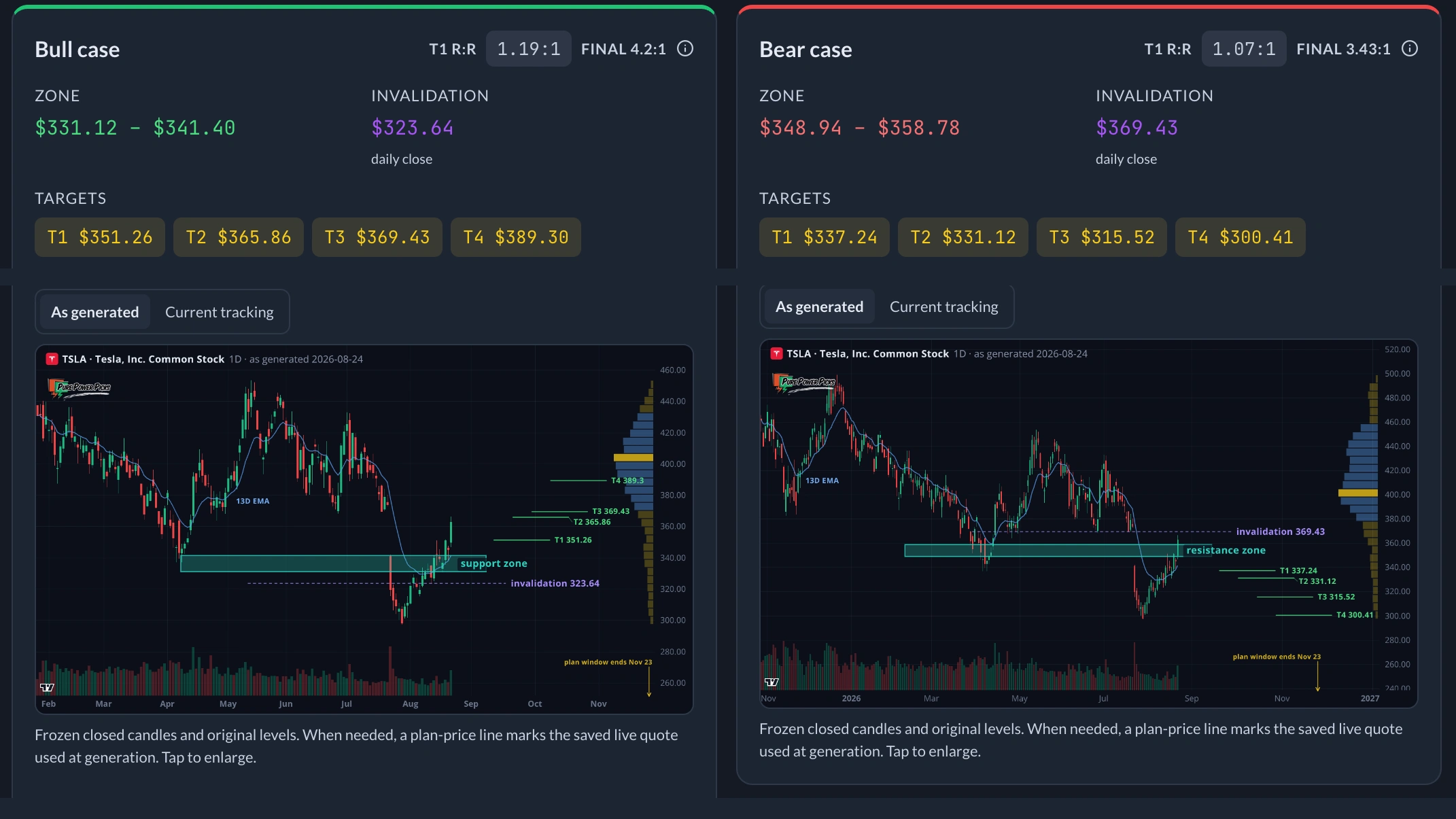
Choose a ticker. Get both scenarios, with the triggers, targets and invalidation laid out.
 WattAI assistant
$105 is the trigger. Targets: $110, then $115. Below $90, the setup is invalidated.
Ask about an alert, your watchlist or the market. Get an explanation you can follow.
Full membership also includes the Watchlist, alert tracker, chart workspace, Data Flow and Discord trading room. See membership options →
Member feedback
“They don't overwhelm you with multiple picks every day.”
“I work a full-time job so this works for me.”
“PPP has Full transparency, all power picks are posted and tracked.”
“Their Discord community is extremely active and full of valuable insights…”
“The user-friendly design and concise alerts make keeping informed and making informed choices easier.”
Your first 7 days
We'll email you the new alerts we publish during your first seven days. You can also get them in the app.
Usually 3 to 5 alerts per week, depending on what we publish. Free email access is not a paid membership or a billing trial.
Get the PPP app for push notifications.


Before you start
The highest option price the tracker recorded after an alert, shown against the contract price at the alert. It is not a realized return. The results page shows all past member alerts and results, including the alerts that did not work.
Typically 3 to 5 per week. The number depends on the setups we publish, rather than a fixed daily quota.
Yes. You can use the browser platform and receive alerts by email. The app adds mobile access and push notifications.
Risk and invalidation are part of understanding the service. Review the full results page and its methodology, rather than judging the service by one selected example. Recorded price changes are not realized trade returns.
Free email access delivers the new alerts we publish during your first seven days, with no credit card. Full membership continues the alerts and unlocks the member features shown above. The monthly membership trial is a separate signup and starts recurring billing after the trial unless canceled.