

The free trading journal that grades you, not just your trades.
Log a trade in one row. Win rate, R-multiples, expectancy, profit factor, your equity curve, and a discipline score all compute automatically. Google Sheets, Excel, and Notion versions, plus a printable PDF for your desk. No fluff, 500 rows pre-wired.
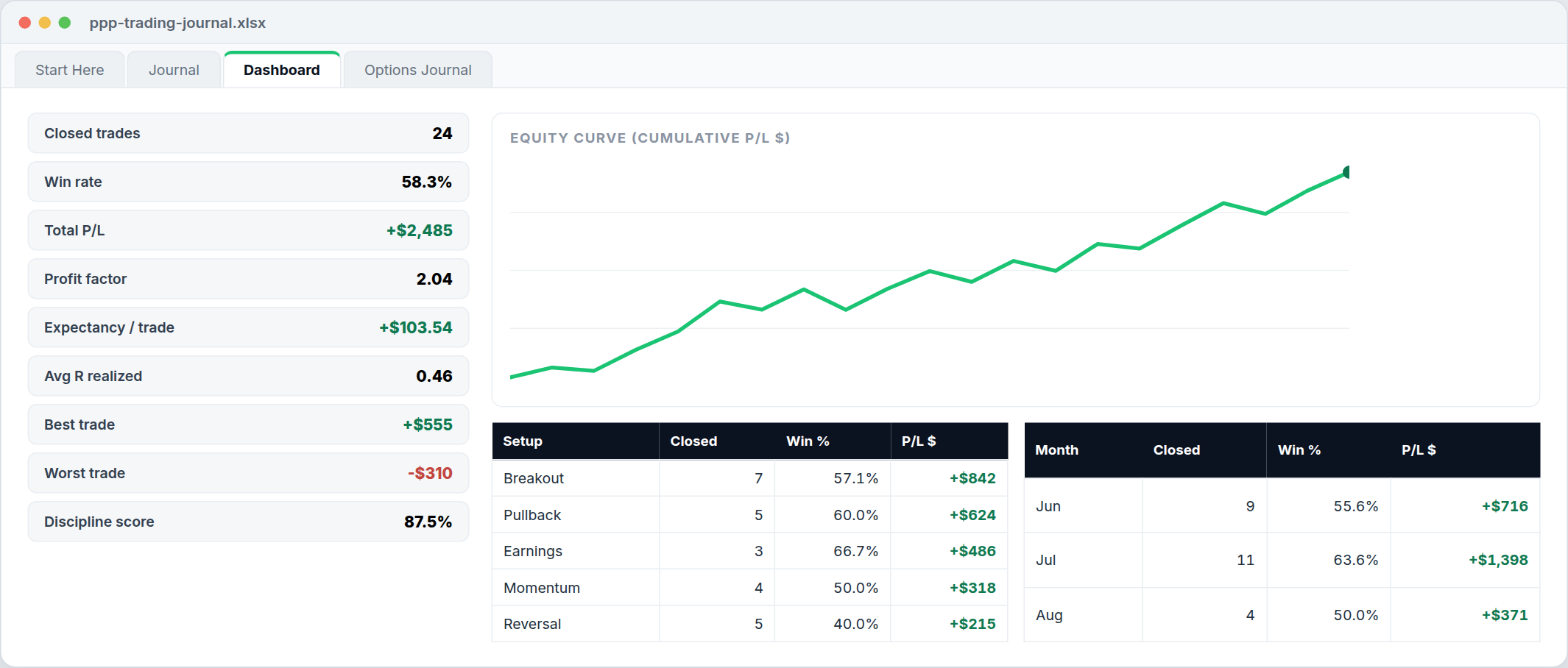
What the template calculates for you
Per trade
P/L in dollars and percent, planned R vs realized R, win/loss/breakeven. Direction-aware, so longs and shorts both compute correctly.
Your edge
Win rate, average win vs average loss, profit factor, and expectancy per trade. These four numbers tell you if your approach makes money.
Discipline score
Grade every trade “followed plan: Y/N.” If your score is under 90%, the leak is the pilot, not the plan.
Breakdowns
By setup (breakout, pullback, reversal, and more), long vs short, month by month, plus a live equity-curve chart.
Options too
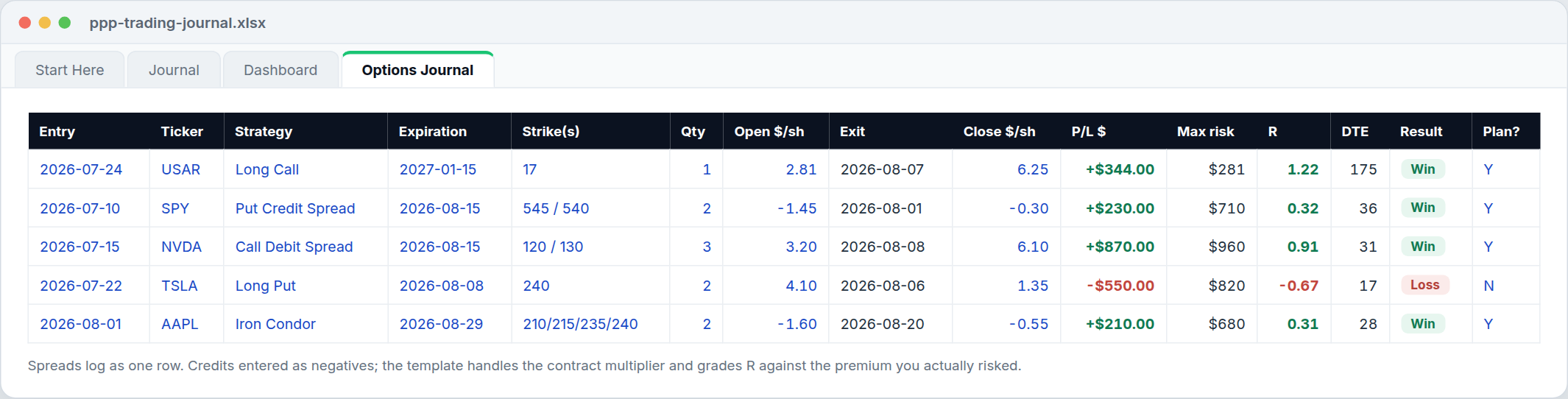
A dedicated options journal tab: log spreads as one position with automatic contract math, R graded against premium risked, and DTE tracking. Long calls to iron condors.
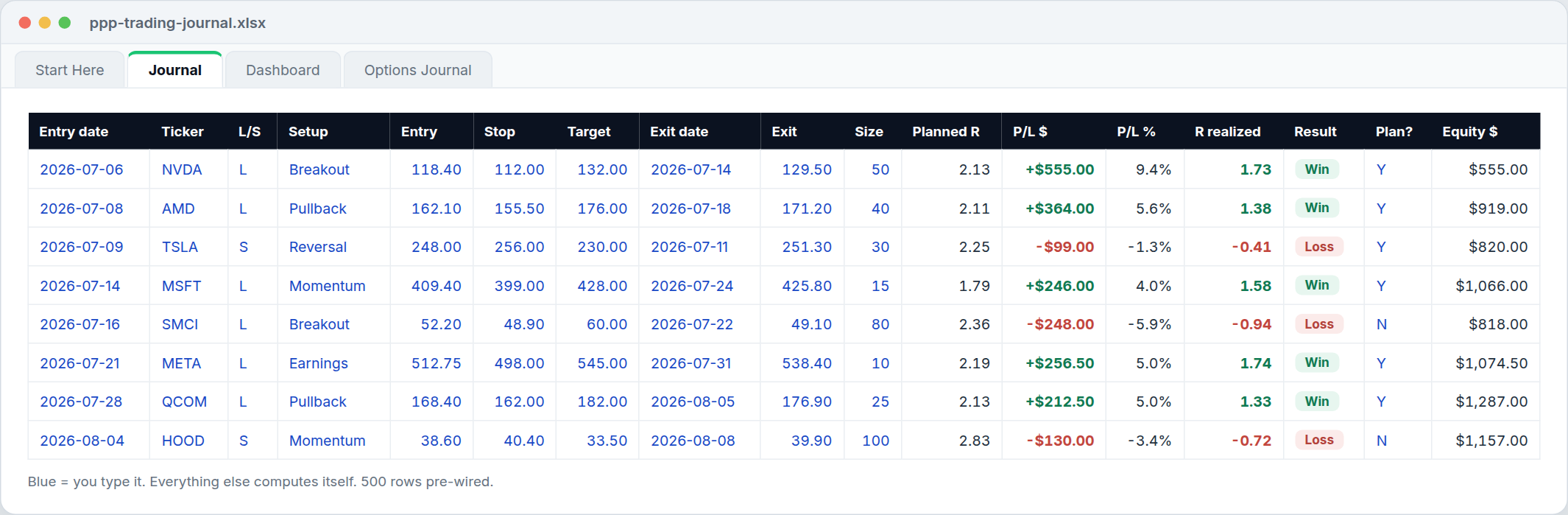
How to use it (2 minutes)
- Log the trade when you plan it. Ticker, direction, setup, entry, stop, target. The template computes your planned R before you risk a dollar.
- Close it out. Exit date, exit price. P/L, realized R, and your equity curve update instantly.
- Grade it. Did you follow your plan, Y or N? This one column exposes more than every other stat combined.
- Review the Dashboard weekly. Which setups pay you, which months bleed, and whether your losses come from your system or from breaking it.
What is a trading journal?
A trading journal is a record of every trade you take: what you traded, why, where you entered, where your risk level and target sat, and what actually happened. The stats layer on top (win rate, expectancy, R-multiples) turns that record into an answer to the only question that matters: does your process make money, and where does it leak?
What should I track in my trading journal?
The minimum that produces real answers: date, ticker, direction, setup type, entry, stop (risk level), target, exit, size, and whether you followed your plan. Our template tracks exactly that, and nothing you’ll abandon after a week.
Can I journal options trades with it?
Yes, and that’s the part most free templates get wrong. The Options Journal tab logs positions at the spread level: enter your net debit or credit per share to open and to close, and the template handles the contract multiplier, computes P/L, grades every trade as an R-multiple against the premium you actually risked, and tracks days to expiration. Long calls, verticals, credit spreads, iron condors, covered calls. One row each, no per-leg bookkeeping.
Is there a Notion trading journal template?
Yes, and it is free like the rest. The Notion trading journal template mirrors the spreadsheet: a stock journal and a position-level options journal as Notion databases, with P/L, R-multiples, and win/loss computing automatically and a worked example row in each. Click Duplicate in the top corner and it lands in your own workspace.
Does it work for day trading, forex, or crypto?
Yes. The journal is instrument-agnostic: anything with an entry, a stop, an exit, and a size logs the same way, and the math is direction-aware so shorts compute correctly. Day traders get a Scalp setup type in the dropdown and the same discipline score, which matters most at high trade counts. Crypto logs cleanly in units instead of shares. For forex, log prices in your account currency per unit and R still grades every trade against the risk you planned.
Google Sheets, Excel, Notion, or printable PDF?
Google Sheets if you want it on every device and easy to share. Excel if you want a free download that runs fast, offline, and fully yours. Both spreadsheets carry the same columns and the same formulas, so you can switch later without losing your history. The printable PDF is for traders who think better on paper: the same columns as the spreadsheet, one page for stocks and one for options, with the R formula printed on the sheet. And the Notion trading journal template is for traders whose notes already live in Notion: the same stock and options logs as native databases with the P/L and R formulas built in. Open it and hit Duplicate and it is yours.
Stop guessing which trades to take.
The journal shows you the leak. The System hands you the plan: 3 to 5 researched trade alerts a week, reasoning written out, levels drawn on the chart, every alert tracked in public. Every tool in every plan.
New to journaling? Start with What is a trading journal (and what to actually track), or compare the best trading journals of 2026.
Related free tools: Covered Call Calculator · Options Profit Calculator · all free tools