


Best Charting Tool: TradingView
When it comes to charting, there is no shortage of options. However, when you have been in the trading realm for some time, the needs for a charting platform become quite clear. Of course, this can vary depending on your style of trading. Still, there is one charting tool that we have found to excel in almost every necessity for any given trader.
We put TradingView at the top of our list. Personally, I have used charting for Think or Swim by TD Ameritrade, E-Trade, DAS Trader, e-Signal, & various other apps for both desktop and phones. These have the ability to all be sufficient charting platforms. But when it comes down to it, if you’re looking for an all in one platform for desktop charting, and on the go mobile charts, TradingView is by far the best choice.


TradingView features
FREE – Yes, they have a freemium model. This means you can access some of the charting features for no cost at all. While this is nice for viewing stocks during no market hours, it is not a good choice for analyzing stocks during trading hours. It also does not allow you to view multiple charts on one screen, nor use all the available time frames & studies. The free version does not have real-time stock data. It does however, offer charting real-time data for cryptocurrency prices.


Browser based & mobile app
What’s nice about this software is, it’s browser based. This means you do not need to download any software for your computer. It simply runs on your internet browser. So whether you have a Mac or a PC computer, this charting app should run great on any mobile browser you use to surf the internet.
They also have a great charting app for your cell phone. If you are mobile and on the go, then this charting app is perfect for you. The app is very clean like the desktop version, with about just as much features!
Abundance of fundamental metrics, indicator & strategies
There is no shortage of indicators, metrics & charting strategies when you upgrade to a paid version of their product. Virtually every charting indicator & metric is available on their platform. If it isn’t available as a basic template, they have a robust system where you can adopt other users template creations from a public library, or build your own using custom scripts. They offer everything from basic moving averages and volume indicators to the most complex studies on the market.
Drawing tools
Like to draw on your charts? Well you’re in luck! TradingView offers an extensive drawings tool to allow you to markup your charts however you like. They offer everything from basic trend lines, all the way to complicated layover drawings like Fibonacci technicals. They most likely have any study you want to view on your charts.
Advanced features
If you are looking for an all in one tool, look no further. With TradingView, you can set up a stock screener to help you find the right stocks that fit your criteria. There is a strategy tester you can run on your charts. There is also the ability to connect your trading platform so that you can place orders right inside of TradingView. They also allow the ability to paper trade, which is always a nice feature for new and experienced traders to test the waters.
Covers all the basics
- Time frames include 1 second through monthly. There is also the option to create your own time frames.
- Over 10 chart representations including bars, candles, line, hollow, Heikin Ashi.
- Up to 8 charts per window, with syncing capabilities of symbol, crosshair, interval, time, drawings.
- Save templates to easily load in different windows or to view on your cell phone.
- Multi device access depending on the plan you have.
- Alerts & notifications
- Company fundamentals, stock information & headlines
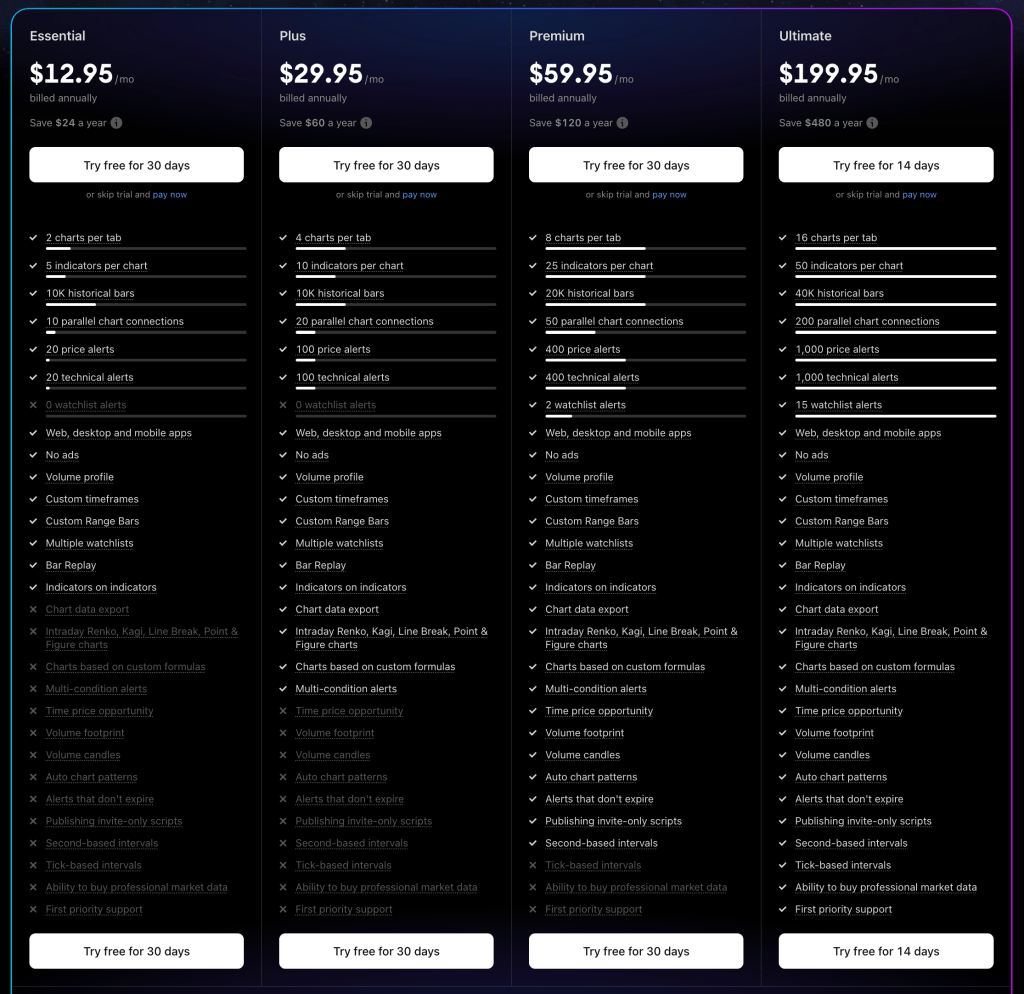
- Flexible pricing
Pricing Table from TradingView
If you still have questions about TradingView, charting, or anything related to stock and options trading on the market, hit us up by filling out the form below!
Frequently Asked Questions
Is TradingView’s free version sufficient for options trading?
The free version lacks real-time stock data and limits you to single chart viewing, making it inadequate for serious options trading during market hours. You’ll need a paid subscription to access the real-time data, multiple timeframes, and advanced technical indicators essential for effective options analysis.
Can I use TradingView on both desktop and mobile devices?
Yes, TradingView runs seamlessly across all devices since it’s browser-based for desktop and offers a full-featured mobile app. Your charts, templates, and settings sync across devices, allowing you to monitor positions and analyze setups whether you’re at your desk or on the go.
What makes TradingView better than broker-provided charting tools?
TradingView excels with its extensive library of indicators, superior drawing tools, and ability to create custom scripts that most broker platforms can’t match. The platform also offers advanced features like support and resistance levels analysis and comprehensive screening tools that provide deeper market insights than typical broker charts.
Does TradingView integrate with my existing trading platform?
TradingView connects with many popular brokers, allowing you to place trades directly from their charts without switching platforms. This integration streamlines your workflow by combining TradingView’s superior charting capabilities with your broker’s execution, creating a more efficient trading experience.
How much should I expect to pay for TradingView’s premium features?
TradingView offers flexible pricing tiers starting around $15-60+ per month depending on the features you need. The investment pays for itself quickly when you consider the platform’s comprehensive toolset replaces multiple separate services, and proper strategic chart analysis can significantly improve your trading decisions.
Ready to Trade Smarter?
Great charting tools are just the beginning — combine them with proven strategies and real-time market insights. Explore our educational resources and trade alerts to take your options trading to the next level.