

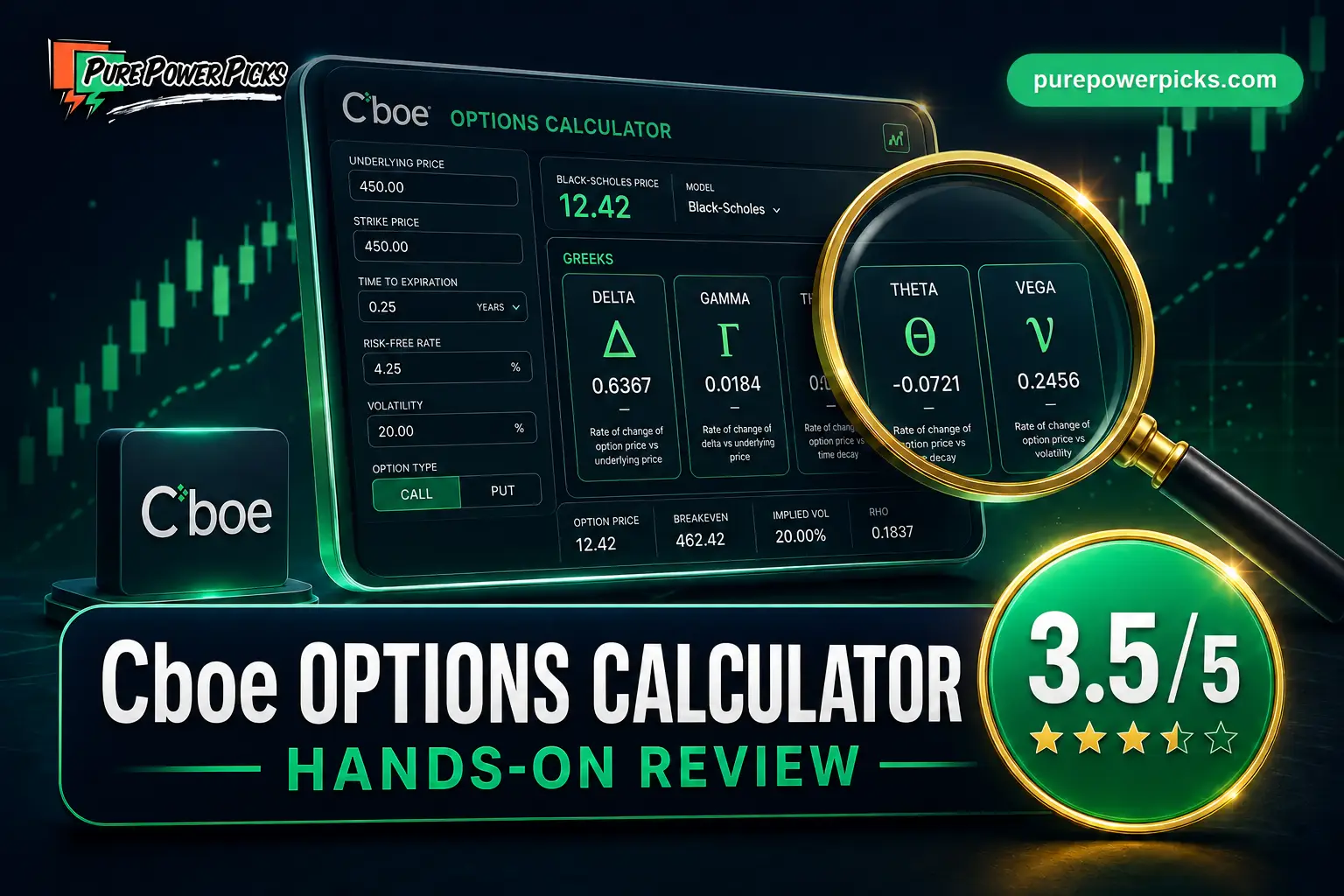
Cboe Options Calculator Review (2026): How to Use It
Share


Verdict: As a free educational calculator, Cboe earns 3.5/5: it exposes the important assumptions and makes theoretical price and Greek sensitivity easy to test. As a trade-planning tool it is closer to 2.5/5 because it does not build multi-leg positions or chart total P&L.
Cboe calls this an intuitive calculator for new and seasoned traders, powered by its All Access APIs. That description fits: select a symbol or customize the assumptions, then study the theoretical price and five Greek values. Our 3.5/5 score grades that educational job—not the features of a brokerage or full strategy platform.
Is the Cboe Options Calculator useful? Yes—if you judge it as the focused educational calculator Cboe built, not as a trading platform. Cboe describes itself as a global derivatives and exchange network offering access to options, futures, cash equities, and FX; in U.S. options specifically, it operates four listed cash-equity options markets. That is more precise than calling it one “primary” U.S. exchange.
The current calculator can pull an underlying symbol and price or accept custom assumptions. Option volatility is an input, not a calculated output. After you choose the option type, exercise style, dates, strike, stock or index price, volatility, interest rate, and any dividends, it returns a theoretical price plus exactly five major Greeks: Delta, Gamma, Rho, Theta, and Vega.
It still has a firm ceiling. There is no multi-leg strategy builder, combined-position payoff chart, or price-by-date heatmap. Use Cboe to learn how one contract responds to changing assumptions; use a position calculator when you need to plan the whole trade.
How Much Does the Cboe Options Calculator Cost?
The calculator costs $0 and works without registration, an email address, a trial, or a paid upgrade. It is a public Cboe education tool rather than a subscription product.
- Free to use with no account or registration
- Published by Cboe, a global derivatives and exchange network with four U.S.-listed cash-equity options markets
- Displays theoretical price plus Delta, Gamma, Rho, Theta, and Vega
- Supports symbol lookup, custom prices, American or European exercise style, and optional dividends
- Useful for changing one assumption at a time and seeing the model response
- Models one option at a time, not a combined multi-leg position
- No total-position payoff diagram, breakeven chart, or price-by-date heatmap
- Shows a theoretical value rather than an executable option quote or bid-ask spread
- The page does not document how every displayed Greek is scaled, so compare the raw values rather than converting units by assumption
- Mobile layout overflowed horizontally in our 390-pixel test
How to Use the Cboe Options Calculator
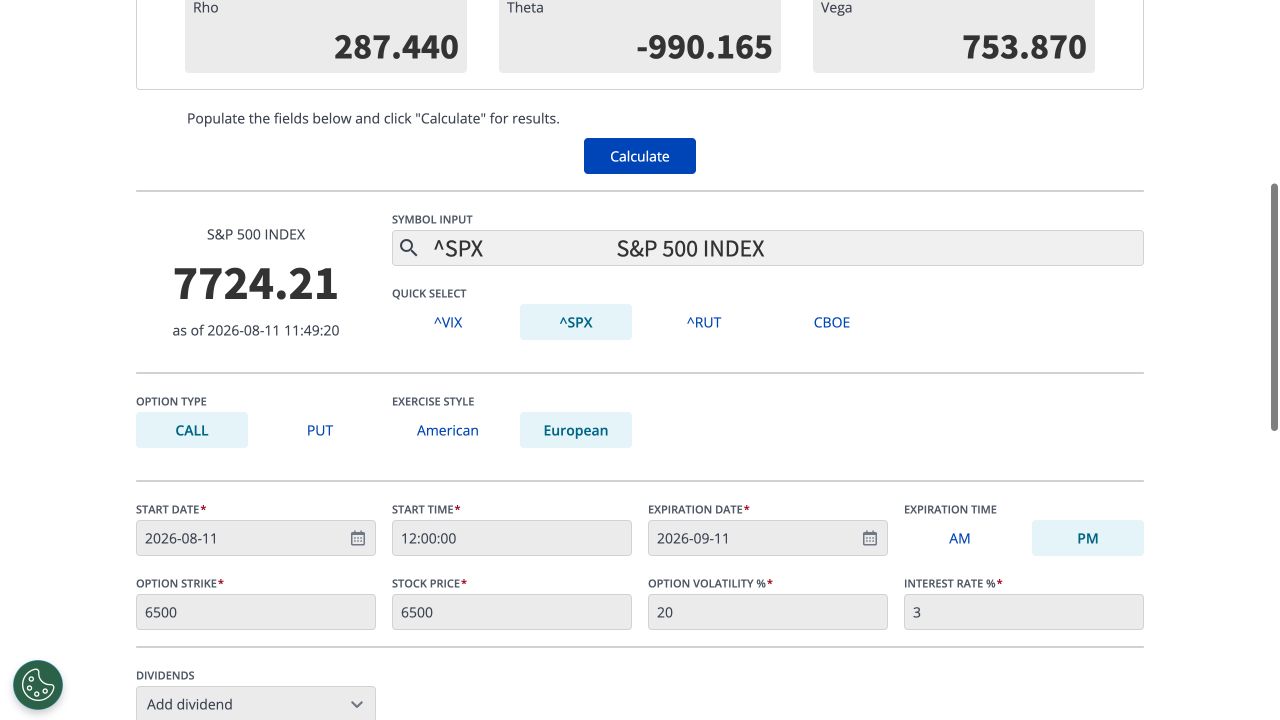
- Select an underlying or enter your own price. Search by symbol or use a quick-select button, then confirm the Stock Price field you want the model to use.
- Choose the contract setup. Pick Call or Put, then American or European exercise style.
- Set the clock. Enter the valuation start date and time, expiration date, and AM or PM expiration.
- Enter the assumptions. Add strike, stock or index price, Option Volatility %, Interest Rate %, and optional dividend details.
- Click Calculate and compare. Record theoretical price, Delta, Gamma, Rho, Theta, and Vega. Then change one input at a time so you can see which sensitivity caused the difference.
Volatility is an input. Cboe does not calculate implied volatility from an option price in this interface. You supply Option Volatility %, and the calculator uses it to produce the theoretical price and five Greek values.
Worked Example: A Fixed SPX 6500 Call
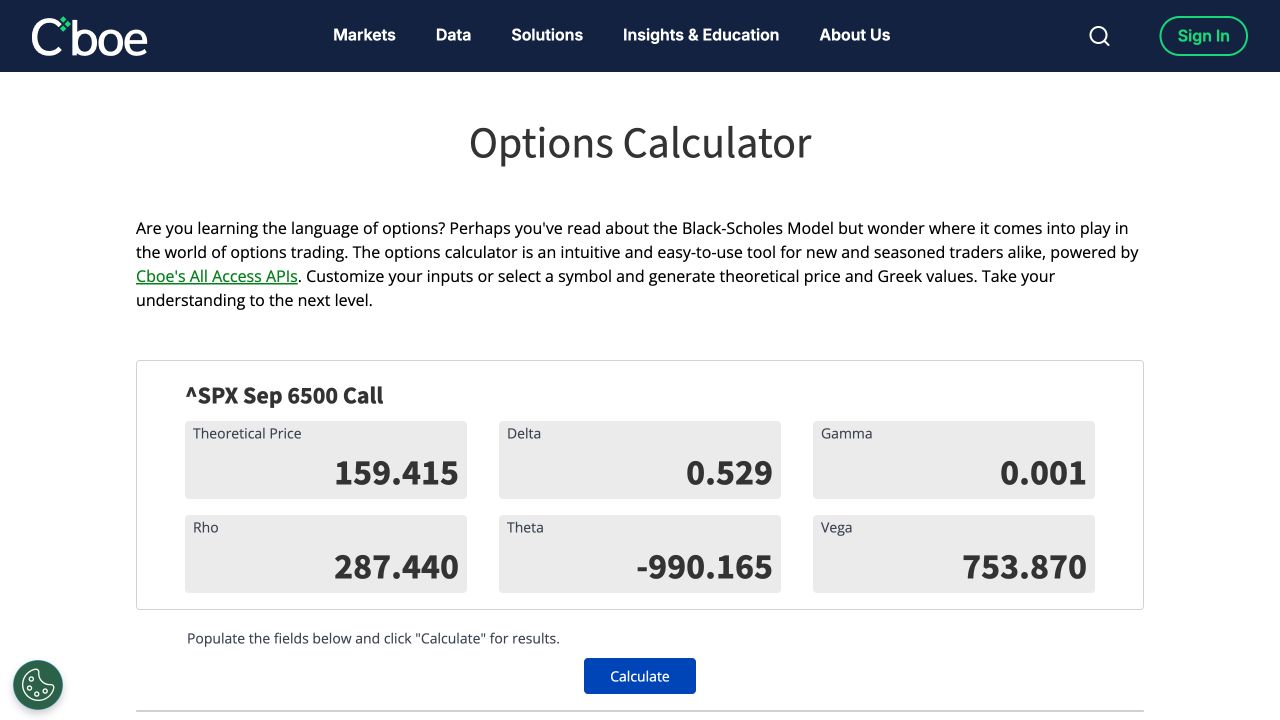
We ran this exact setup on August 11, 2026. To keep the math reproducible, we selected ^SPX but overwrote the live underlying quote with a fixed 6500 Stock Price. The live SPX quote remained visible in Cboe’s symbol panel, but the calculation used the values entered below.
Cboe displayed these outputs after we clicked Calculate:
Those are the calculator’s raw displayed values—not numbers we converted or back-solved. Cboe does not explain the scaling of every Greek beside the result card, so the safest workflow is comparative: keep the setup fixed, change one input, and observe how each displayed value moves.
What Can You Actually Do With the Cboe Calculator?
The current interface is more capable than a bare five-field Black-Scholes form. It accepts a symbol, Call or Put, American or European exercise style, start and expiration date/time, strike, stock price, option volatility, interest rate, and optional dividends. Cboe’s current Options Institute page says the tool taps Cboe market data, and our test showed a timestamped underlying quote after selecting ^SPX.
That does not make the theoretical price a tradable quote. The page does not show a contract’s bid, ask, volume, open interest, or full option chain. Its job is to help you explore how assumptions affect one option’s modeled value and Greeks.
Cboe frames the calculator as a way to see the Black-Scholes model in action, while the present interface also offers American/European exercise controls and dividend inputs. The page does not name the exact pricing method used behind each mode, so we would not describe the whole current tool as “Black-Scholes only.”
Can You Build Multi-Leg Strategies?
No. The calculator evaluates one call or put at a time. It cannot combine legs into a vertical spread, iron condor, straddle, covered call, or custom position, and it does not plot combined profit and loss across price and time.
That is why the trade-planning score is 2.5/5 even though the educational score is 3.5/5. A single-leg Greek is valuable for learning, but a trader choosing strikes needs total debit or credit, maximum risk, breakevens, and the interaction among every leg.
For that job, start with PPP’s free options profit calculator. It models up to six option legs plus a stock position and shows a payoff chart, price-by-date heatmap, breakevens, position Greeks, and ten strategy presets without a login.
Is It Good for Learning the Five Major Greeks?
Yes. This is the calculator’s best use case. The result card shows Delta, Gamma, Rho, Theta, and Vega beside the theoretical price. Change only the Stock Price to study Delta and Gamma; shorten the dates to explore Theta; alter Option Volatility % to see Vega respond; or move Interest Rate % to isolate Rho.
The key is controlled experimentation. Record the baseline, move one input, calculate again, and compare. That loop turns the definitions in our guide to the five option Greeks that matter into something tangible.
The teaching limitation is guidance: the calculator page explains its purpose, but it does not walk through the meaning or scaling of each result. Bring a Greek reference and treat the outputs as theoretical sensitivities, not a forecast.
How Is the Desktop and Mobile Experience?
Desktop is straightforward. At a 1280-pixel viewport, the six result cards and input form were readable and logically grouped. The stripped-down design is fast once you know which assumptions to enter.
Mobile is the clear weak spot. At a 390-pixel viewport, the document expanded to roughly 1,020 pixels wide and the result cards ran off-screen horizontally. You can still reach the fields by panning, but it is not a comfortable phone workflow. That result supports the 4/10 mobile score rather than relying on an impression of the design.
Who Is the Cboe Options Calculator Best For?
- Beginners who want to see how one option’s theoretical value responds to price, time, volatility, and rates.
- Students and self-learners working through Black-Scholes concepts and the five major Greeks.
- Experienced traders who want a fast, free sensitivity check on a single contract assumption.
- Cboe product users who value quick-select access to ^VIX, ^SPX, ^RUT, and CBOE underlying data.
Skip it as your primary planning tool if you need a full chain, executable bid-ask quotes, multi-leg modeling, or a visual payoff over price and time. Cboe itself describes the broader company as a global derivatives and exchange network; this calculator is one focused education tool inside that much larger organization.
How Does the Cboe Calculator Compare?
The three tools solve different problems. Cboe is the cleanest sensitivity lab for a single option. OptionStrat offers the broadest commercial strategy workflow. PPP’s calculator is the strongest free next step when you want to turn a single-contract lesson into a multi-leg payoff plan without creating an account.
Frequently Asked Questions
Is the Cboe Options Calculator worth using?
Yes, as a free educational calculator. We score it 3.5/5 for learning because it exposes the main assumptions and returns a theoretical price with five Greek values. We score it 2.5/5 for trade planning because it cannot combine legs or chart a position’s total payoff.
Is volatility an input or an output?
Volatility is an input. The field is labeled “Option Volatility %.” The calculator does not solve for implied volatility in this interface; its outputs are theoretical price, Delta, Gamma, Rho, Theta, and Vega.
Which Greeks does the Cboe calculator show?
It shows exactly five major Greeks: Delta, Gamma, Rho, Theta, and Vega. Those five names are the precise description of the current result card.
Does it use live market data?
The current interface can select a symbol and display a timestamped underlying price using Cboe market data. The calculated option value is still theoretical, and the page does not show an executable option quote, bid-ask spread, or full option chain.
Does the calculator use Black-Scholes?
Cboe introduces the tool by asking where the Black-Scholes model comes into play. The current interface also lets you choose American or European exercise style and enter dividends. Because Cboe does not label the back-end method for each mode on the page, “Black-Scholes only” is too broad a description of the present interface.
Can it model spreads or covered calls?
No. It models one option at a time. Use PPP’s free options profit calculator for verticals, iron condors, covered calls, custom positions, and other setups with up to six option legs plus stock.
Move from one-option sensitivity testing to payoff charts, a price-by-date heatmap, breakevens, position Greeks, and up to six legs plus stock. No login and no ads.
Use PPP’s Free Options Profit Calculator →
Want educational setup ideas too? Explore our trade alerts.
Review sources and methodology: the live Cboe Options Calculator, Cboe’s company description and U.S. options-market description, and the official OptionStrat features and membership pages. Our calculator test was run August 11, 2026 using the inputs and original screenshots shown above.
Disclaimer: Pure Power Picks is not a licensed financial advisor. All content is for educational and informational purposes only and should not be considered investment advice. Options trading involves substantial risk of loss and is not suitable for all investors. Past performance does not guarantee future results. Tool features and pricing may change; verify current details on the official websites.
Related Reviews
More platforms we’ve reviewed for options traders:
- Black Box Stocks Review →Real-time stock and options alert system with proprietary…
- Trade Ideas Review →AI-powered stock scanner with Holly AI assistant, real-time…
- OptionStrat Review →Visual options strategy builder with multi-leg payoff analysis…
- Barchart Review →Comprehensive market data platform with powerful options…
Share

The PPP Team is the research and editorial team behind Pure Power Picks. We trade stocks and options and publish the work as we do it, with every alert tracked in public. Publishing since 2020. How we research and correct our work is written out in our editorial standards. Our content is strictly educational, never advice.